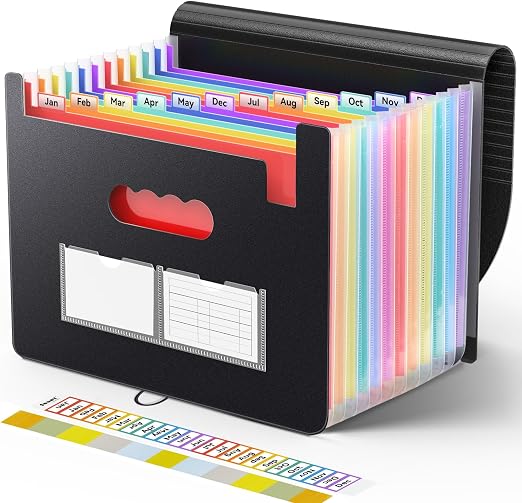
Uquelic 13-Pocket Receipt Organizer Review: The Paper-First Tax Prep Setup
4.5 / 5
Overall Rating
Uquelic 13-Pocket Receipt Organizer
For filers who refuse to scan everything, Uquelic's 13-pocket accordion folder with monthly tabs and a desk-friendly footprint is the cleanest analog solution.
- 13 pockets to subdivide receipts by category
- Stand-up desk design with long-size pockets
- Expands at top and bottom for more capacity
We may earn a commission if you make a purchase through our links.
Pros
- 13 pockets to subdivide receipts by category
- Stand-up desk design with long-size pockets
- Expands at top and bottom for more capacity
- Durable PP, odourless; bonus tag stickers
Cons
- Compact 10x4.9 inch size suits receipts, not files
- Open accordion design has no lock
Not every filer wants to go paperless
Scanners are great, but a decent portion of tax filers genuinely prefer paper. If that's you, the two requirements are: enough structure to stay sorted (monthly or category tabs) and a desk-friendly footprint (not a shoebox). Uquelic's 10" × 5" expanding organizer meets both.
The build
- 13 pocket slots, one for each month of the year plus a "notes/totals" slot
- Pre-printed month labels + 13 blank labels if you prefer category sorting (utilities, meals, travel, etc.)
- Stand-up design — the folder holds its shape on a desk; doesn't flop over when half-full
- Elastic closure so receipts don't fan out in transit
- Pocket size — 10" × 5" fits standard register receipts without folding; longer pharmacy receipts bend slightly
How to use it for tax prep
One workflow we've recommended to first-year self-employed filers:
- Keep the folder on the desk, not filed away. Access friction = lost receipts.
- Drop receipts in by month as they arrive. Don't sort by category; that's a filing-season job.
- Tally at month-end — 10 minutes on the first Sunday of each month. Write the month total on the outside tab.
- End of year: 12 totals → spreadsheet → Schedule C. If you need to dig for a specific receipt, you know the month.
Limits
- Not a long-term archive. One year per folder. Keep older years in a file cabinet (DEVAISE 3-drawer pairs well).
- Not water-resistant. Don't store under a window or near the coffee machine.
- Capacity — ~300-400 standard receipts comfortably; 500+ and it gets tight.
Vs. alternatives
- vs. shoebox — $10-$15 for actual structure is worth it
- vs. scanner-only workflow — slower at year-end, but zero hardware overhead and no software subscription
- vs. apartment-sized file cabinet — drops in a desk drawer, cabinet doesn't
The verdict
If you've resisted scanning and your tax prep currently lives in a pile on the kitchen counter, this is the upgrade. Low friction, pre-structured, and actually reaches April still organized.
Maximum Tax Deductions Checklist
47 commonly missed tax deductions for freelancers, small business owners, and W-2 employees. Includes home office, vehicle, equipment, and retirement contribution strategies.
The average user saves $1,200+
Instant download. No spam. Unsubscribe anytime.
Our Verdict
Affiliate Disclosure
Discussion
Sign in with GitHub to leave a comment. Your replies are stored on this site's public discussion board.